Introduction
This is the official full documentation on Ethone.
Here you are going to find everything about the Selfbot there is.
Custom Scripts
Simple explanation what custom scripts are and how to use them.
Basics
Custom scripts are made in Python. They are used to implement things into the selfbot made by you or the community.
The library used to interact with discord is called discordpy-self.
Scripts need to be placed as example.py in /Data/Custom.
Imports
Ethone has a list of modules that you can use while creating custom scripts, here it is:
import os
import random
import json
import time
import asyncio
import discord
import requests
import threading
import pyfade
from datetime import datetimeExamples
Command example:
@Ethone.command()
async def gaytest(et, user: discord.User):
  message = await et.send(f"Is {user.name} gay?")

  await message.add_reaction("👍")
  await message.add_reaction("👎")
Event example:
keyword = "Ethone"

@Ethone.listen("on_message")
async def worddetector(msg):
    if keyword in msg.content:
      print(f"""Word Detector
Server: {msg.guild.name}
Channel: {msg.channel.name}
Author: {msg.author.name}
Message: {msg.clean_content}""")
Config Guide
Your main settings can be found in config.json right next to the Executable.
To edit the file use a text editor like Notepad.
Prefix
"Prefix" is the trigger word before any command. The default is .
When talking about the Prefix it is often refered as (p) which is a short form for (prefix).
Example: (p)help | .help
Delete timer
"Delete timer" is the amount of seconds that Ethone waits before deleting the response message. The default is 100
Example: You use .help | Help message gets deleted 100 seconds after.
Mode
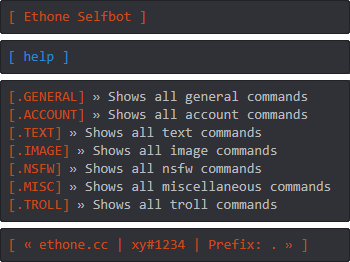
"Mode" defines in what style response messages get sent in. The default is embed
You can choose between 3 modes.
This mode is called embed:
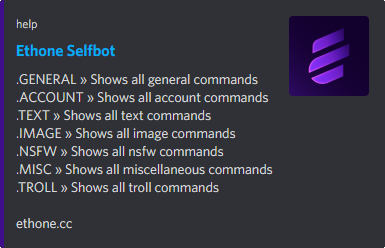
This mode is called quote:

This mode is called codeblock:
Theme
"Theme" is the name of the json file in /Data/Themes that you want to be used. The default is ethone
"Stream URL" is the stream link that gets opened when using (p)stream. The default is https://www.twitch.tv/ninja Youtube video and twitch streamer links get accepted by discord. Example: https://youtu.be/dQw4w9WgXcQ "Scrape on group join" defines if you want to have the GC Scraper on or off. The default is on Ethones GC Scraper works like this: You added into a group and Ethone will automatically scrape the entire history of that groupchat. The chatlog gets saved in /Data/Groupdump. GC Scraper can be useful when getting added to a groupchat and then removed 10 seconds later, always have information backed up :) "Auto group leave" defines if you want to automatically leave group chats. The default is on Even with GC Scraper enabled it wont be an issue, as Ethone will just leave after it has finished scraping. "Toast notifications" defines if you want to receive windows toasts on events or not. The default is on If you dont know what toasts are, they are basically the same as the Windows Defender popups. "Webhook Logging" defines if you want to get webhook notifications on events. The default is off If you want to use webhook logging make sure theres a webhook in /Data/webhook.json. Alternatively you can just execute the command (p)webhookcreate, which will do everything for you. "DM Logging" defines if you want to log messages that get deleted in your DMs. The default is on Our afk system was made to be hyper realistic. The goal was to prevent the other side thinking it was a selfbot, and that goal has definitely been reached. Ethone waits a few seconds before starting to type to simulate clicking on the DM, then based on the length of the sentence you chose starts typing and eventually sends the message. "Afk mode" defines if you want Ethones afk system enabled or not. The default is off "Afk response" defines what to send as response. The default is Hey, please contact me later! I'm busy right now. "Afk response cooldown" defines how much delay in seconds you want before it will reply again. The cooldown is not for everyone, it is per user. The default is 600 "Nitro sniper" defines if you want the Nitro sniper enabled or not. The default is on The Nitro sniper will search for any message containing Nitro. If it finds a valid Nitro code it will automatically redeem it to your account. "Giveaway joiner" defines if you want to automatically join giveaways. The default is on "Giveaway cooldown" defines the seconds you want to wait before entering a giveaway that is posted. The default is 120 "Privnote sniper" defines if you want to snipe links from privnote.com and log the content of it. The default is on "Presence" defines which status Ethone should use. You can choose between online, idle, dnd or offline. The default is online "Token" defines what discord account Ethone should connect to. A guide on how to get your token is below. The default is token-here The main features of Ethone, only the best of the best are on this list. A Ethone classic, (p)webraid. You are able to define the channel name and message to spam. Webraid will delete every channel, then create 50 channels and automatically asign a webhook to every single one, which gets spammed immediately. The messages getting sent have a hidden @everyone mention built into them, which is not viewable for anyone. 50 channels with 30 pings per result in 1500 pings in a matter of seconds. (p)cloneserver. A very strong command. This command creates a copy of the chosen server without any permissions needed. It will copy the name, server icon, channels, roles, emojis etc. Very useful. (p)tokeninfo. The best token information tool there is. Wanna know why? Ethones integrated tokeninfo command gets the UserID, AvatarID, Creation date, Phone number, Email, Hypesquad House, Nitro Status, Friend amount, Server amount, 2FA Status and even attach a screenshot being inside the token! Yes, no joke, while you sit back and relax, Ethone gets a screenshot of what is happening in the token, along with every other information you could wish for. The most reliable way against getting termed, (p)backupaccount. This command will back up 3 sections: Servers, friends and your profile. For every server you will get the name, ID, if you are admin and a invite/vanity url. For every friend you will get their username and ID. For your profile username, ID, about me, banner color, accent color, banner link and profile picture link are going to be saved. With that backed up you are safe to go. Save any chat, any time, where ever you want. You define the amount of messages to dump. (p)chatdump. Simple. Effective. Discord enables threads permissions by default, almost every server has them on. You can open over 200 threads in 15 seconds using (p)spamthreads. Spams the chat and the channel tab. Easiest 1 man raid you've ever done. Worried about getting tokenlogged? No problem. Ethone will detect any logins on your account, even if they use a token to sign in. You will be notified what sessions are active, what device and OS. 1 Command, boom. Complete token destroyed. (p)nuketoken will mass dm their friends list, remove all friends, close all dms, leave all servers, spam create servers, change bio, status and mess up their settings (lightmode etc.) while keeping you updated whats currently happening. Discord patched rich embeds for users, Ethone uses Web embeds instead. They are as close as you can come to the original. Our message builder runs text from the commands through url encoding to get a crispy clean embed.
Ever added to a groupchat just to be kicked out a moment later? Ethones GC Autoscrape feature will prevent that. As soon as you get added it will automatically scrape the entire chat history of the groupchat and save it in /Data/Groupdump. Very useful, always have things backed up. Need to get the job done for dming hundreds of people in a server? Ethone got you covered, (p)dmall. Console will log if dm went through or not. Want to annoy the server but dont have permissions? No problem, (p)massmention. Ethone will scrape dms, then format those into text messages to spam thousands of people in seconds. Down to troll your friend? (p)mutualghostping should be perfect for you. Ethone will ping the target in every channel, in every mutual server. A pain to clear all those pings! PS: If you have administrator in any of the guilds they are going to be ignored, just to prevent ghost messages in #announcements :) Theres a lot more to explore in Ethone, it has more than 300 features! These were our users favourites. Make sure to check the other features out too.Stream URL
GC Scraper
Auto group leave
Toasts
Webhook Logging
DM Logging
Afk System
Afk Mode
Afk Response
Afk Response Cooldown
Nitro Sniper
Giveaway Joiner
Giveaway Cooldown
Privnote Sniper
Presence
Token
Best Features
Webraid
Cloneserver
Tokeninfo
Backupaccount
Chatdump
Thread spam
Session Notifier
Nuketoken
Web Embeds
GC Autoscrape
Dmall
Massmention
Mutualghostping
So Much More